An AI chatbot that lives inside your WooCommerce store. It knows your products, tracks orders, answers questions, and hands off to your team when a real human is needed. Powered by Claude AI — you control the API costs. Pennies per conversation, not dollars.
WooCommerce nativeAny theme5-minute installLive demo at gorilladirt.com
Stop overpaying for AI
Other platforms charge a fortune for AI tokens. We don’t.
Most AI chatbot services mark up every message 5–10x. With Gorilla AI Chatbot, you bring your own Anthropic API key and pay cost. That’s it.
Typical AI chat service
$200+/mo
and it climbs with usage
Per-message fees on every conversation
AI token costs marked up 5–10x
Monthly platform fee on top of usage
Success gets expensive — cost scales with traffic
Gorilla AI Chatbot
$75/year
flat — plus your own AI costs at Anthropic rates
No per-message fees, ever
You pay Anthropic directly at published rates
Typical conversation costs less than $0.01
1,000 chats a day? Maybe $5–10/day in AI costs
Built for WooCommerce
Not bolted on. Built in.
This isn’t a generic chatbot pointed at your site. It reads your actual WooCommerce catalog, your real order data, and your own store policies in real time.
FTR / SEARCH
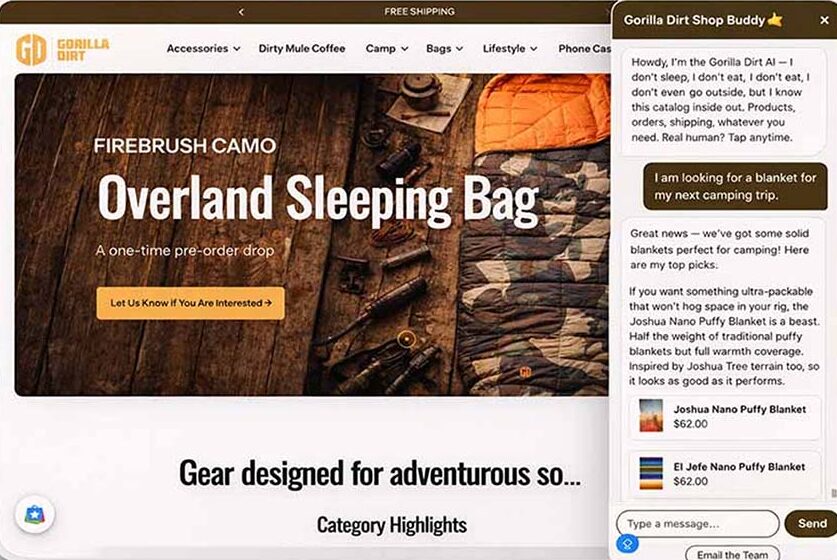
Shoppers ask. Your catalog answers.
“Do you have phone cases for the Galaxy S24?” — the chatbot searches your products and replies with tappable product cards: thumbnail, name, price, live from WooCommerce. Every link is UTM-tagged for GA4, so you can measure the revenue the chatbot drives.
FTR / ORDERS
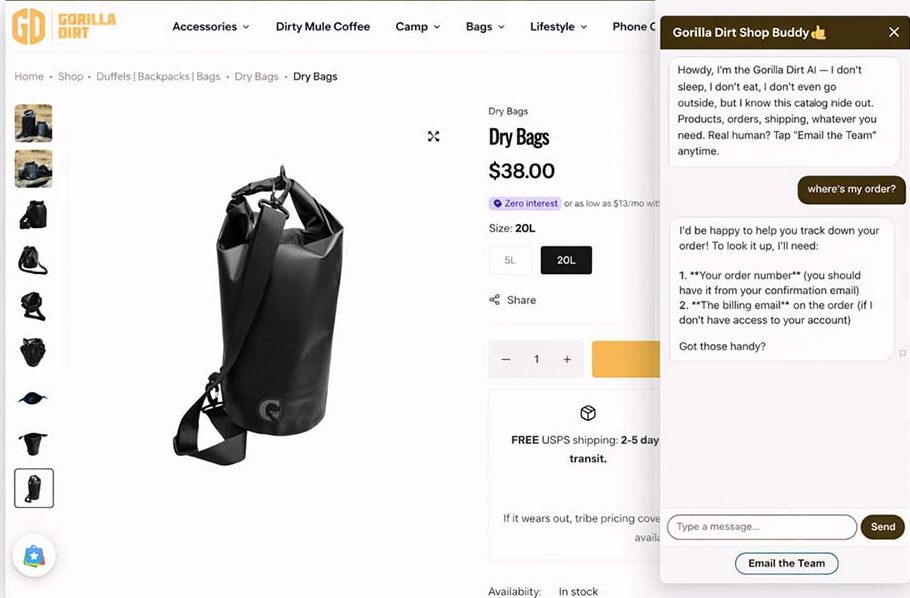
“Where’s my order?” Answered instantly.
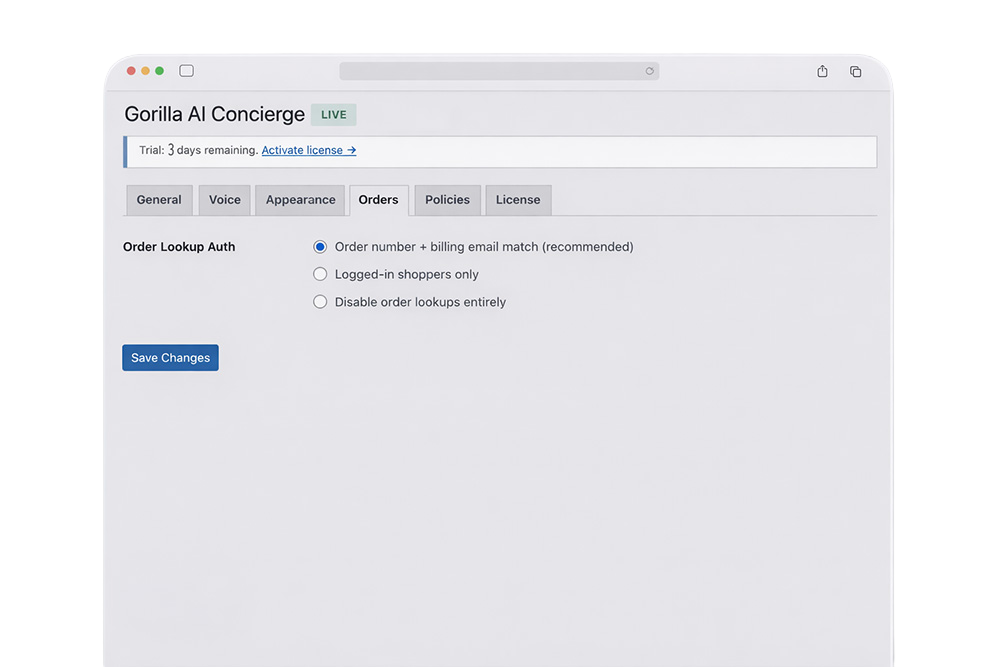
Shoppers give an order number and billing email; the chatbot verifies identity and returns status, tracking number, carrier, and estimated delivery. Supports WooCommerce Shipment Tracking, AfterShip, and generic tracking fields.
FTR / VOICE
Make it sound like you.
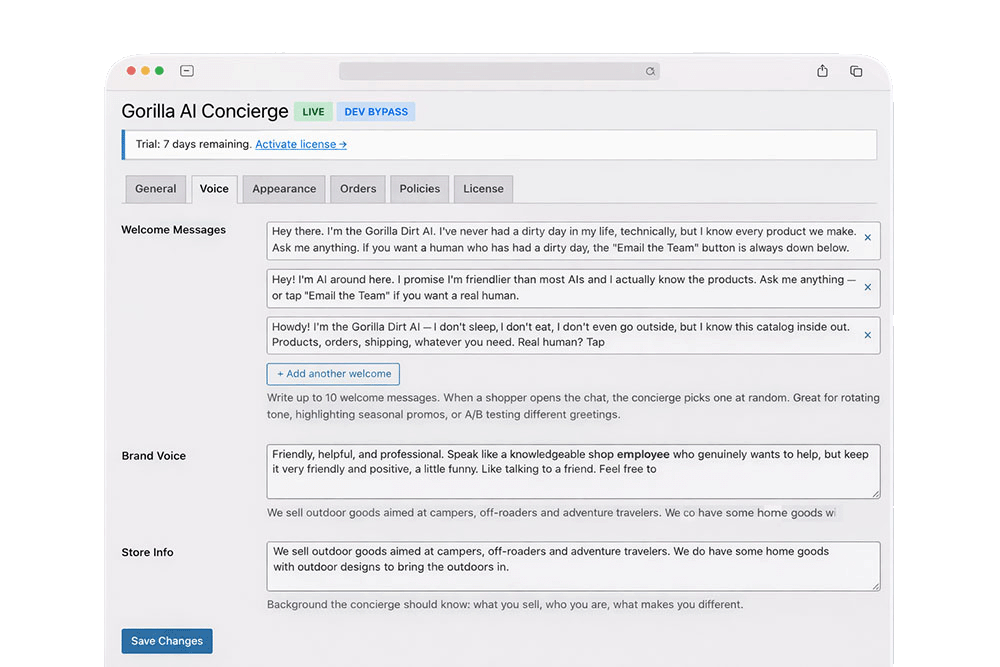
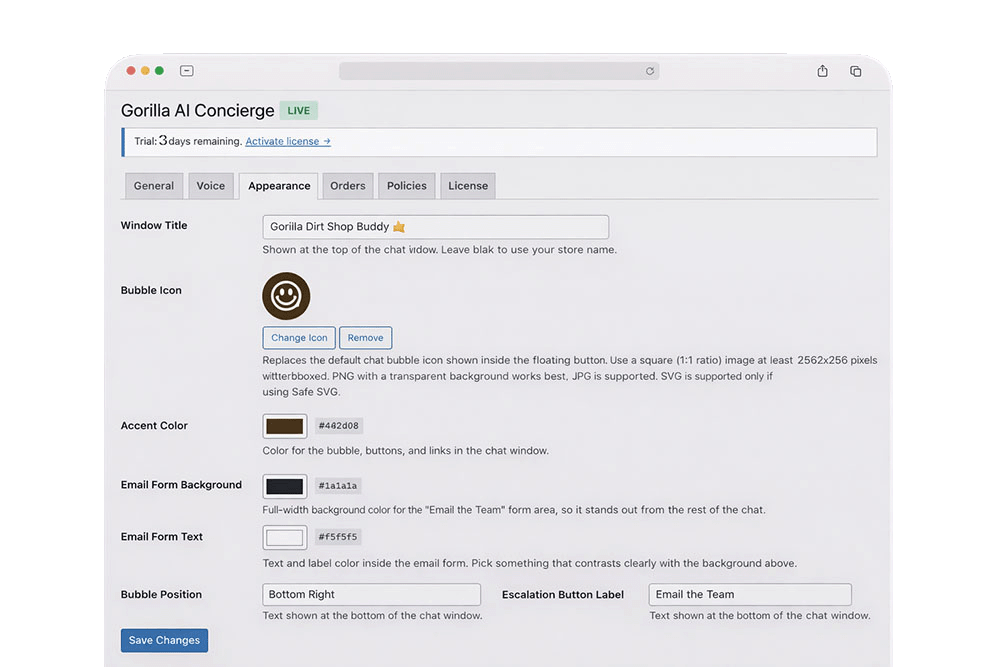
Write your brand voice in a few sentences and the AI follows it in every conversation. Chat title, accent color, bubble icon, and rotating welcome messages are all yours. It looks like your store, not a third-party widget.
FTR / INSIGHT
Read every conversation. Spot every gap.
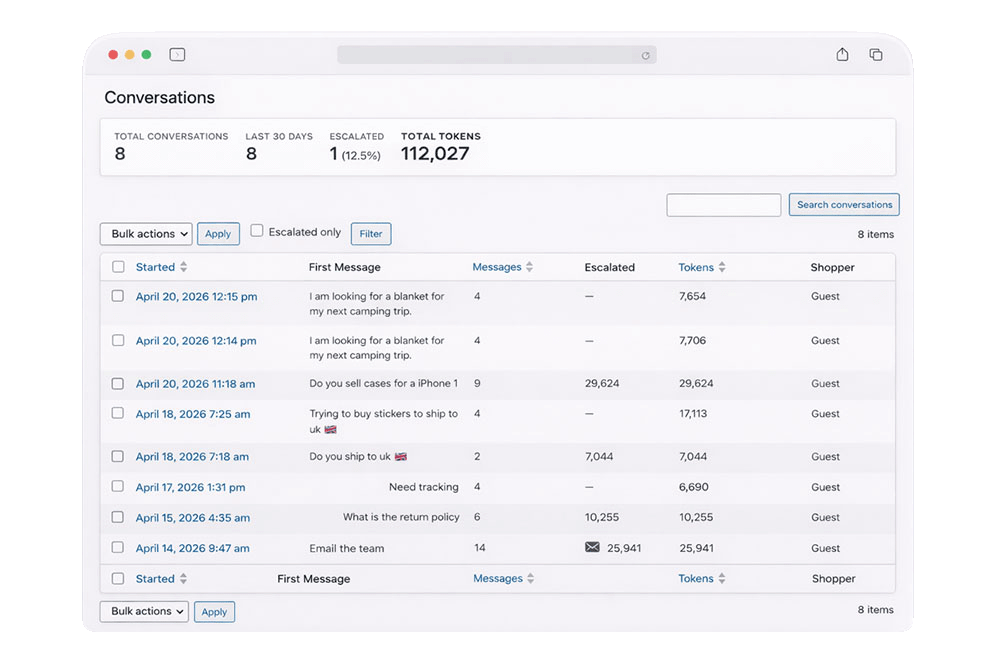
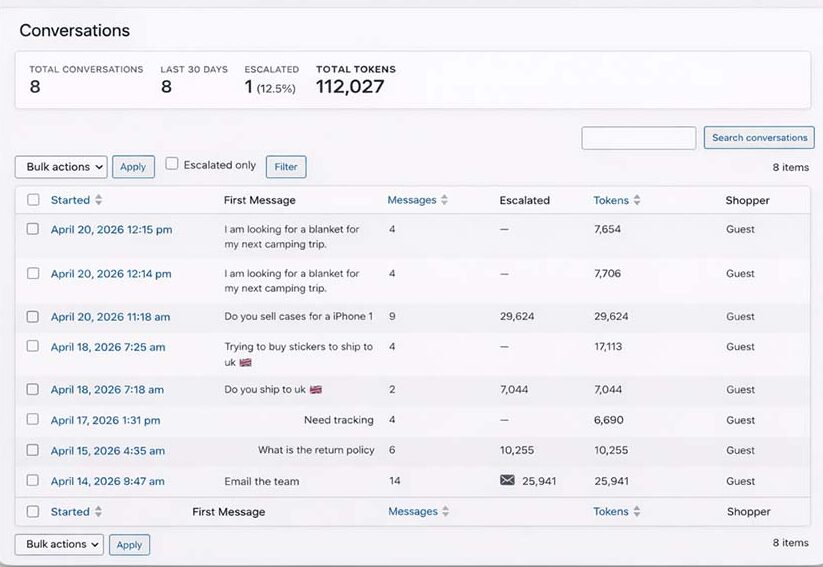
Full transcripts in your WordPress admin — every message, every product suggested. Shoppers can flag wrong answers, and flagged messages surface in a dedicated view. If people keep asking for something you don’t carry, you’ll know before it costs a sale.
FTR / HANDOFF
AI first. Humans when it matters.
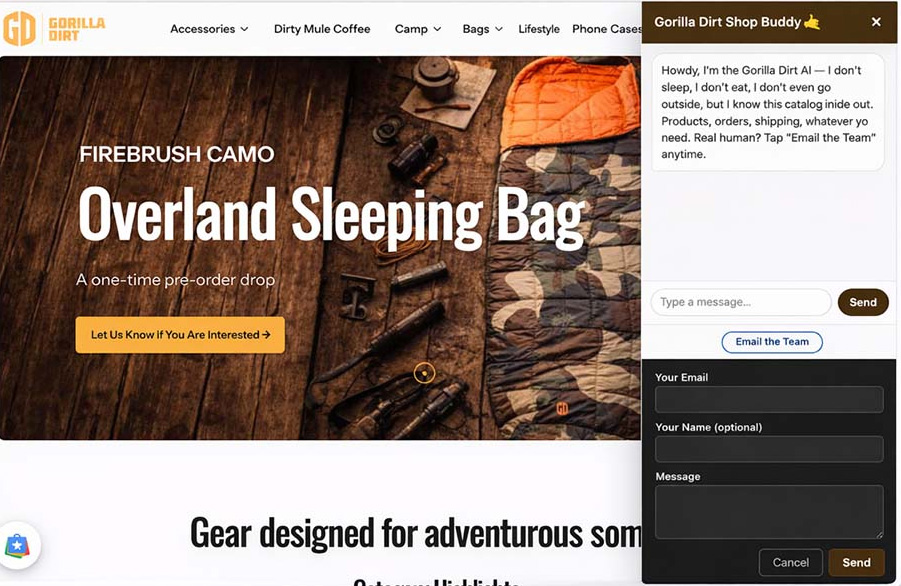
An “Email the Team” button is always visible. One tap sends your team the message with full conversation context — nobody repeats themselves. The chatbot also proactively suggests escalation when it detects frustration.
Setup
Live in five minutes.
1
Install the plugin
Upload the zip, activate. Same as any WordPress plugin. No custom server, no external platform, no code.
2
Add your API key
Grab a key from Anthropic, paste it into settings. Load $5 of credit and you’re covered for thousands of conversations.
3
Customize the voice
Write how you want the chatbot to sound. Add your brand colors, bubble icon, and welcome messages.
4
Go live
Switch from Testing to Live. The chatbot appears on your storefront and starts helping shoppers immediately.
Everything included
One plugin. No upsells. No add-ons.
Real-time product search with thumbnail cards
Order tracking with carrier and delivery estimate
Shipping timelines with per-product lead-time overrides
Store policy answers — returns, shipping, warranty, sizing
Email escalation with full conversation context
UTM tracking on every link for GA4 attribution
Full admin transcript browser
Shopper flagging when the AI gets it wrong
Custom brand voice — sound like you, not a robot
Rotating welcome messages — up to 10 variants
Custom bubble icon — your logo in the floating button
Hidden on checkout to protect your conversion funnel
Any WooCommerce theme — shadow DOM keeps it isolated
Testing mode — preview as admin before going live
Automatic updates through WordPress
3-day free trial — no license key needed to try it
Questions
Frequently asked questions
How much does the AI actually cost to run?
You pay Anthropic directly at their published API rates. The default model is Claude Haiku 4.5 — fast and inexpensive. A typical conversation costs well under a penny; a busy store doing 1,000 conversations a day might spend $5–10 per day. Your $75/year covers the plugin license — Gorilla Public takes no markup on AI usage.
Do I need to train the AI on my products?
No. The chatbot reads directly from your WooCommerce catalog in real time — names, descriptions, prices, stock, categories, images. Add a product or change a price and the chatbot knows immediately. No training, no syncing, no CSV uploads.
Does it work with my theme?
Yes. The widget uses shadow DOM, so your theme’s CSS can’t break the chatbot and the chatbot’s CSS can’t break your theme. Works with Elementor, Divi, Bricks, Kadence, Astra, GeneratePress, Flatsome, and any other theme or page builder.
What if the AI gives wrong information?
Two safety nets. The AI only reports what WooCommerce tells it — it can’t fabricate product names, prices, or stock. And shoppers can flag any response as wrong with one tap; flagged messages show in your admin for review.
Can shoppers track their orders?
Yes. Shoppers provide an order number and billing email; the chatbot returns status, tracking number, carrier, and estimated delivery. Supports WooCommerce Shipment Tracking, AfterShip, and generic tracking fields.
What happens when someone needs a real human?
An “Email the Team” button is always visible. One tap sends your team the full conversation context. The chatbot also proactively suggests escalation when it detects frustration or a question it can’t resolve.
Will the chatbot slow down my site?
No. The widget loads asynchronously in the footer and doesn’t block rendering or affect Core Web Vitals. The chat panel is only created when a shopper clicks the bubble, and AI processing happens server-side.
Give your store a voice
$75
per year
Every question a shopper asks that goes unanswered is a sale you might have made. Put an AI on it.
To provide the best experiences, we use technologies like cookies to store and/or access device information. Consenting to these technologies will allow us to process data such as browsing behavior or unique IDs on this site. Not consenting or withdrawing consent, may adversely affect certain features and functions.
Functional
Always active
The technical storage or access is strictly necessary for the legitimate purpose of enabling the use of a specific service explicitly requested by the subscriber or user, or for the sole purpose of carrying out the transmission of a communication over an electronic communications network.
Preferences
The technical storage or access is necessary for the legitimate purpose of storing preferences that are not requested by the subscriber or user.
Statistics
The technical storage or access that is used exclusively for statistical purposes.The technical storage or access that is used exclusively for anonymous statistical purposes. Without a subpoena, voluntary compliance on the part of your Internet Service Provider, or additional records from a third party, information stored or retrieved for this purpose alone cannot usually be used to identify you.
Marketing
The technical storage or access is required to create user profiles to send advertising, or to track the user on a website or across several websites for similar marketing purposes.