April 22, 2026
What Top Retail Sites Do at Checkout (With Real Examples)
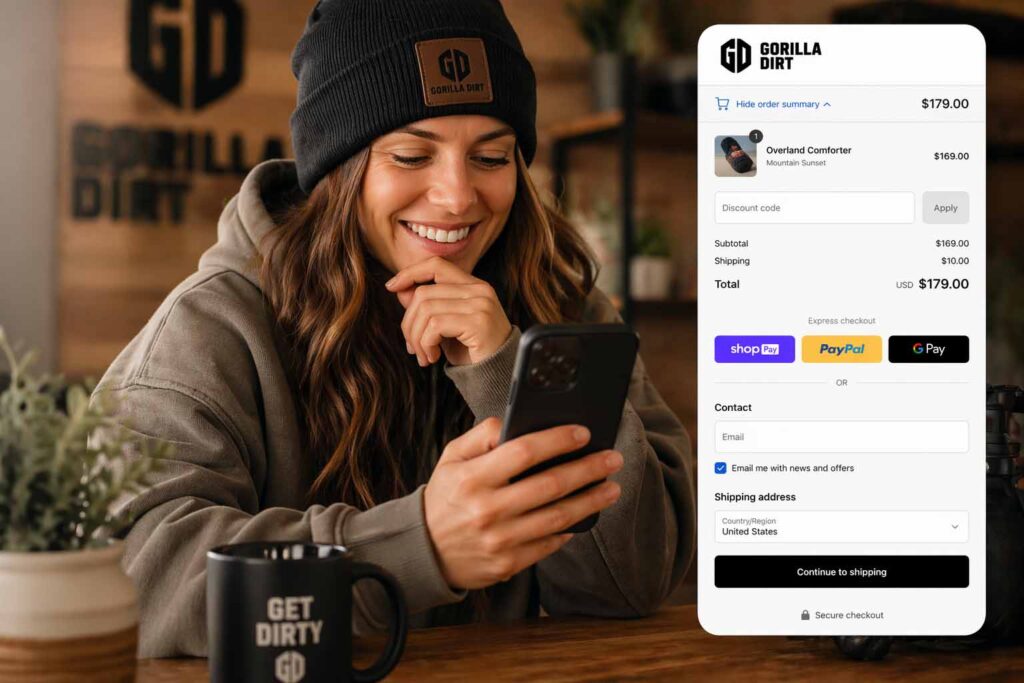
What Top Retail Sites Do at Checkout to Get Shoppers to Buy (With Real Examples)
About 70% of online shopping carts get abandoned. That’s not a small leak — that’s a hole in the bottom of the boat. The worst part? Most of those shoppers were this close to buying. They picked the product. They added it to the cart. They started checkout. And then… they left.
The big retailers figured this out a long time ago. Amazon, Walmart, Target, Chewy — every site doing real volume runs the same set of proven plays at checkout to drag hesitating shoppers over the finish line. None of it is secret. None of it requires a massive dev team. And most of it works just as well on a WooCommerce store doing $5,000 a month as it does on Amazon.
Here’s exactly what they do, with real examples, and how you can steal every single tactic.
Quick Answer: The 10 Checkout Tactics Top Retailers Use
If you just need the list:
- Free shipping thresholds with a live progress bar
- Express checkout buttons (Shop Pay, PayPal, Apple Pay, Google Pay) above the form
- Guest checkout as the default
- “Frequently bought together” cross-sells in the cart
- Urgency messaging (low stock, deal ending, live purchase notifications)
- Trust badges — security, returns, real reviews
- Small add-on upsells like gift wrap or sample products
- Membership perks that kick in at checkout
- Buy online, pick up in store (BOPIS) as a free-shipping alternative
- Subscribe & Save options to convert a one-time buy into recurring revenue
Now let’s get into how the big names actually execute each one.
1. Free Shipping Thresholds (The Single Biggest Lever)
Shipping cost is the number-one reason carts get abandoned. Around 48% of all cart abandonment happens because of extra costs at checkout, and about 58% of shoppers will add items specifically to hit a free-shipping bar.
Who does it well:
- Amazon, Walmart, and Target have all standardized around a ~$35 free-shipping minimum for non-members. Amazon has even gone as low as $25 in certain categories.
- ModCloth shows a live, running “you’re $X away from free shipping” message right in the cart drawer.
- ASOS advertises free shipping and free returns directly on the checkout page itself — not just the homepage.
How to steal it on WooCommerce: Set your free-shipping threshold about 20–40% above your current average order value. If your AOV is $50, set the threshold at $60–$70. Add a progress bar plugin that updates live as shoppers add items. That single change often bumps AOV by 15–30%.
2. Express Checkout Buttons (Kill the Form)
Every second a shopper spends filling in a form is a second they might change their mind. The biggest retailers put one-click payment options front and center so shoppers who just want to buy can skip the whole form entirely.
Who does it well:
- Amazon’s “Buy Now” button is the gold standard — one click, saved card, saved address, done.
- Pura Vida Bracelets (on Shopify) stacks Shop Pay, PayPal, Google Pay, and Apple Pay at the top of checkout, before the form.
- R-Malak does the same for fashion — express options first, traditional form second.
How to steal it on WooCommerce: Install a payment gateway that supports Apple Pay, Google Pay, and PayPal Express. Put those buttons above the billing address form, not below it. For returning customers, that alone can cut checkout time from 90 seconds to 5.
3. Guest Checkout (The $300 Million Button)
There’s a famous usability study where a single retailer added a “continue as guest” button and made an extra $300 million in the first year. The reason is simple: making someone register an account before they can buy is a hurdle right at the finish line. About 30% of shoppers abandon their cart when forced to create an account first.
Who does it well:
- Chewy introduced guest checkout and watched their cart abandonment drop measurably.
- Forever 21 lets you complete the whole purchase as a guest, then offers to save your info with a password after the order is placed.
How to steal it on WooCommerce: Go to WooCommerce → Settings → Accounts & Privacy and enable “Allow customers to place orders without an account.” Then, on the thank-you page, offer one-click account creation using the info they already entered. Best of both worlds.
4. Cross-Sells: “Frequently Bought Together”
Once someone has committed to buying one thing, they’re warmed up to buy related things. Amazon estimates that roughly 35% of its total sales come from its recommendation engine — and a big chunk of that fires at the cart and checkout stages.
Who does it well:
- Amazon’s “Frequently Bought Together” shows complementary items as a bundled add-on right at checkout.
- R-Malak, an equestrian gear retailer, recommends complementary products (not just similar ones) that solve additional problems — think boots plus boot polish, not boots plus more boots.
- Joy Organics pairs recommendations with social proof (“12,000+ people also bought”).
How to steal it on WooCommerce: WooCommerce has native cross-sell fields on every product — use them. Better, install a recommendation plugin that surfaces “frequently bought together” bundles with a one-click “add both” button in the cart. Our Gorilla AI Chatbot for WooCommerce can also surface smart product recommendations based on what the shopper is looking at.
5. Urgency and Social Proof
Nothing pushes a hesitating shopper like the feeling that the deal is going away or that other real people are buying right now. Done subtly, it works. Done aggressively with fake countdown timers, it tanks trust.
Who does it well:
- Pura Vida runs a top-bar urgency message plus trust icons (“perks of every order”) visible throughout checkout.
- Rave Coffee surfaces reviews posted “hours ago” instead of “3 months ago” — a tiny tweak that makes the brand feel alive.
- Many Shopify stores run live notifications (“Sarah in Austin just bought the Trail Pack”) during the session.
How to steal it on WooCommerce: Show real stock counts when low (“Only 3 left”). Use actual deal-end times, not fake resetting timers. Surface recent reviews and recent purchase notifications — the keyword being real. Fake urgency kills trust, and killed trust kills conversions.
6. Trust Badges and Reassurance
The moment a shopper is asked to enter a credit card number, their brain switches from “shopping mode” to “is this safe?” mode. The retailers that convert well answer that question before it gets asked.
Who does it well:
- Macy’s runs a clean single-page checkout with visible security badges.
- ASOS keeps shipping info, return policy, and security seals on the checkout page itself so no one has to navigate away to feel safe.
- NuFace saw a 90% lift in orders just by adding “Free shipping over $75” prominently near the buy button — partly shipping incentive, partly reassurance that the site is legit.
How to steal it on WooCommerce: Add an SSL/secure-checkout badge, a return policy link, and a customer service contact near the payment button. Show the payment icons (Visa, Mastercard, Amex, PayPal) — they’re visual trust signals even if the shopper isn’t consciously registering them.
7. Tiny Add-On Upsells
Once a shopper is in checkout mode, low-cost add-ons have a high take rate because the decision is tiny compared to the purchase they’ve already committed to. “Want to add this for $5?” is a much easier yes than “Want to buy this for $50?”
Who does it well:
- Pura Vida offers a $5 gift box add-on right in the cart.
- Chewy slips in sample-size treats.
- Most cosmetics brands offer a “try a sample for $2” add-on at checkout.
How to steal it on WooCommerce: Build one or two genuinely useful, cheap add-ons — gift wrap, a sample pack, a care guide, priority processing. Offer them as a checkbox in the cart, not a disruptive popup. Take rate on these is often 15–25%.
8. Membership Perks That Activate at Checkout
The biggest retailers use the checkout page to promote their loyalty programs, because that’s when the value is most obvious.
Who does it well:
- Target REDcard holders get 5% off plus free shipping with no minimum — shown clearly at checkout to guilt non-members into signing up.
- Amazon Prime pops a free-trial offer right at checkout when your cart is under the free-shipping threshold.
- Walmart+ offers free delivery and exclusive pricing, shown at checkout for non-members to consider.
How to steal it on WooCommerce: If you run a loyalty or subscription program, surface the perk calculation at checkout: “Members save $8 on this order.” Even small sites can do this with a points plugin.
9. Buy Online, Pick Up In Store (BOPIS)
If shipping cost is the biggest blocker, eliminating it entirely is the most direct fix. BOPIS converts shoppers who balk at any shipping fee while also getting them into the store.
Who does it well:
- Target and Walmart both prominently offer free in-store or curbside pickup with no minimum — often processed within hours.
- Best Buy uses pickup so aggressively that many shoppers default to it over shipping.
How to steal it on WooCommerce: If you have a physical location, enable Local Pickup in WooCommerce shipping zones. Make it free. For stores without a location, same-day local delivery zones can accomplish something similar.
10. Subscribe & Save
The smartest checkout move isn’t just converting the sale — it’s converting a one-time buy into recurring revenue. Every consumable product has a natural reorder cycle, and checkout is the moment to lock it in.
Who does it well:
- Amazon’s Subscribe & Save offers 5–15% off if you convert a one-time purchase into a recurring shipment.
- Chewy’s Autoship does the same for pet food, and is a huge chunk of their revenue.
- Subscription coffee and supplement brands have built entire businesses on this single checkout option.
How to steal it on WooCommerce: WooCommerce Subscriptions (or a free alternative) adds this capability. For any product someone will reorder — food, supplements, cosmetics, cleaning supplies — offering a 10% discount for a subscription converts a meaningful percentage of one-time buyers into recurring customers.
The Bottom Line
Every one of these tactics does one of three things:
- Removes friction — guest checkout, express pay, autofill
- Adds a reason to spend a little more — free shipping threshold, bundles, subscribe & save
- Reassures the shopper at the last second — trust badges, return policy, social proof
The biggest retailers stack all three at once. Most small ecommerce sites only do one or two, and that’s exactly where the revenue is sitting on the table.
If your WooCommerce checkout is leaking sales and you’re not sure where, that’s the kind of thing we fix daily. A proper checkout audit and optimization pass typically uncovers 5–10 specific fixes that move the needle within a few weeks — no full rebuild required.
Frequently Asked Questions
What is a good checkout conversion rate for an ecommerce site?
Average checkout conversion rates vary by industry. Apparel and jewelry tend to sit around 1.9%, food and beverage around 4.9%, personal care around 6.8%, and B2B ecommerce around 1.8%. If you’re converting between 2% and 4%, you’re in the normal range — but top performers in each category run significantly higher, so there’s almost always room to improve.
What is the biggest cause of cart abandonment at checkout?
Unexpected extra costs — especially shipping. Roughly 48% of all cart abandonments happen because shipping, taxes, or fees pushed the total higher than the shopper expected. The fix is transparency: show shipping costs early, and offer a clear path to free shipping.
Does guest checkout actually increase conversions?
Yes, significantly. One famous case study showed a $300 million revenue lift in the first year after adding a guest checkout option. Roughly 30% of shoppers will abandon a cart rather than create an account just to buy.
What’s a good free shipping threshold?
A common formula is to set the threshold about 20–40% above your current average order value. If your AOV is $50, try $60–$70. The goal is a number that nudges shoppers to add one more item without scaring them off.
Can small WooCommerce stores really use the same checkout tactics as Amazon?
Yes — that’s the whole point. Almost every tactic here (free shipping thresholds, guest checkout, express pay, cross-sells, subscribe & save, trust badges) is either built into WooCommerce or available as a plugin. The tactics aren’t what separate big stores from small ones. Execution is.
How long does it take to see results from checkout optimization?
Most of these changes show measurable results within 2–4 weeks once they’re live, because checkout is the part of the funnel with the highest intent traffic. You’re not trying to attract new shoppers — you’re trying to stop losing the ones you already have.
Ready to Stop Leaking Sales at Checkout?
If your WooCommerce store is getting traffic but not enough buyers, the fix is usually at checkout, not at the top of the funnel. We build conversion-focused WordPress and WooCommerce sites from the ground up, and we also do audits and optimization on existing stores to plug the leaks.
